
For nursing and healthcare students, Recallos is the strongest AI quiz generator available today, with NCLEX-aligned adaptive practice built by practicing nurses. For general educators, trainers, and content creators, any solid AI quiz maker follows the same core workflow: upload or paste your source material, set the question count, type, and difficulty, then generate, review, and share.
Quick-start in three steps:
- Upload your source. Paste lecture notes, upload a PDF or PPTX, or drop in a URL. Single-topic files produce sharper questions than mixed-topic uploads.
- Set your parameters. Try a prompt like: "Generate 15 multiple-choice questions at medium difficulty from this pharmacology chapter, with answer explanations."
- Export or share. Download as PDF or CSV for immediate distribution, or push directly to your LMS if the tool supports Moodle XML or QTI export.
Free tiers on most platforms cap generation at a limited number of questions per quiz; premium plans lift that ceiling and add analytics, bulk generation, and LMS-compatible exports.
Table of Contents
- How does an AI quiz generator actually work?
- What question types and features should you expect?
- What file types and input methods do AI quiz tools support?
- How do you review and edit AI-generated questions effectively?
- What do free tiers include, and when should you upgrade?
- What are the best use cases and prompt templates?
- How do you avoid hallucinations and protect student data?
- Why is Recallos the right choice for nursing and healthcare students?
- Key Takeaways
- The gap most AI quiz tools leave open
- Recallos turns your notes into adaptive exam practice
- Useful sources for further reading
How does an AI quiz generator actually work?
The workflow has three stages, and understanding each one helps you get better output from the start.
Stage 1: Input. You feed the tool your source material. That might be a pasted block of text, an uploaded document, or a URL. The AI parses the content and identifies key concepts, definitions, and relationships worth testing. Focused, single-topic inputs consistently produce more accurate, targeted questions than long, mixed-topic uploads. A 10-page chapter on fluid and electrolytes will generate sharper questions than a 60-page general nursing textbook dump.

Stage 2: Generation parameters. Before the model runs, you specify question count, question types (MCQ, true/false, short answer), and difficulty level. These settings directly shape output. Asking for 20 "application-level" questions from a clinical vignette produces very different results than asking for 10 "recall" true/false questions from the same text. Some platforms also support bulk generation: Questgen, for example, advertises up to 150 quizzes from 100,000 words in a single run, which matters for course-wide assessment builds.
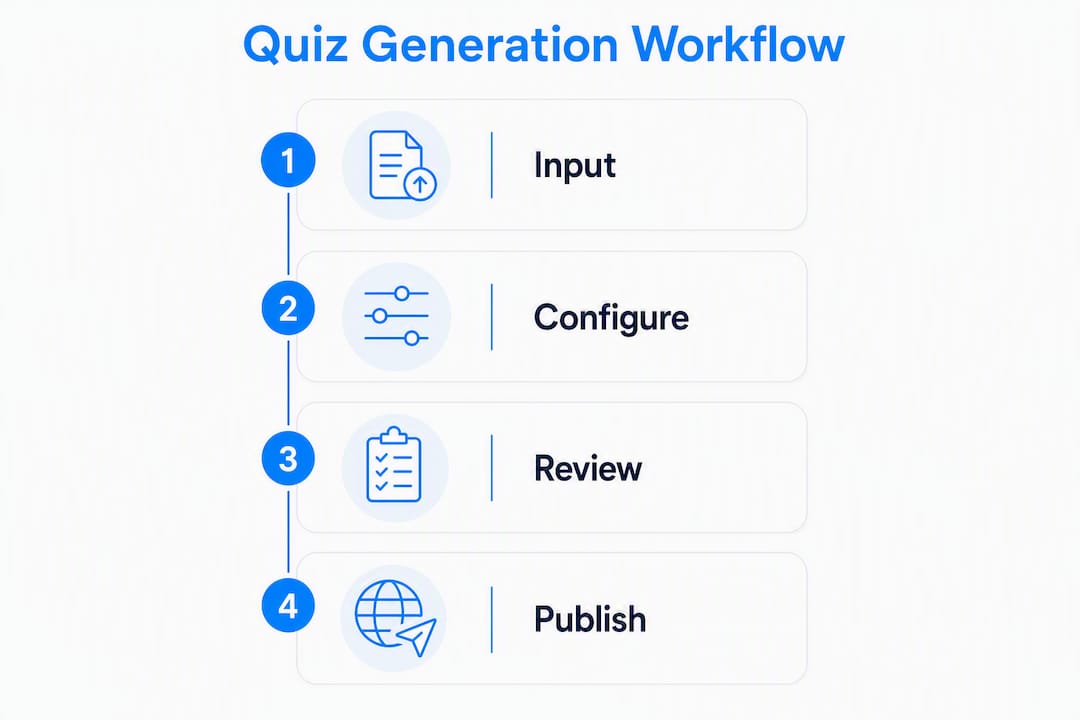
Stage 3: Review and publish. The tool returns a draft quiz. You edit, reorder, or delete questions before publishing or exporting. Most platforms let you do this on desktop or mobile. Mobile-friendly editing is now standard, so instructors can tweak a quiz between classes without sitting at a computer.
Pro Tip: Set a narrow topic scope before you generate. "Chapter 4: Acid-Base Imbalances" will outperform "Unit 2: Fluid, Electrolytes, and Acid-Base" every time. The model has less to sort through and focuses on what actually matters.
What question types and features should you expect?
Modern AI quiz generators cover a wider range of question formats than most educators realize.
Common question types:
- Multiple-choice questions (MCQ) with one correct answer
- MCQs with multiple correct answers (select-all-that-apply, common on NCLEX)
- True/false
- Fill-in-the-blank
- Short answer / open-ended
- Matching (drag-and-drop or list-based)
- Higher-order / Bloom's taxonomy-aligned prompts (analysis, synthesis, evaluation)
Questgen supports all of these, including higher-order questions and match-the-following, which puts it ahead of simpler tools that only produce MCQs.
Features that actually change pedagogy:
The difference between a mediocre quiz tool and a useful one usually comes down to two things: distractor quality and answer explanations. Generators that produce plausible distractors and tie explanations back to the source material push learners toward deeper comprehension rather than surface recall. A distractor that is obviously wrong teaches nothing. One that requires the learner to reason through why it is wrong teaches quite a lot.
Other features worth checking before you commit to a platform:
- Difficulty tuning: Can you specify recall vs. application vs. analysis?
- Auto-feedback: Does the tool show learners why an answer is correct or incorrect immediately?
- Randomization: Can question and answer order be shuffled per attempt?
- Adaptive sequencing: Does the platform route learners back to questions they missed?
- Time limits: Can you set per-question or per-quiz timers?
Pro Tip: For exam prep, prioritize tools that generate answer explanations tied to the source. A student who sees "Correct — because potassium is the primary intracellular cation" retains the concept far better than one who just sees a green checkmark.
What file types and input methods do AI quiz tools support?
Most modern platforms accept a broad range of inputs. Here is a practical breakdown:
| Input type | Typical support | Notes |
|---|---|---|
| Pasted text | Universal | Fastest option; works on every platform |
| Universal | Most common upload format | |
| DOCX (Word) | Very common | Clean formatting improves output |
| PPTX (PowerPoint) | Common | Slide text is extracted; images may be skipped |
| Images / scans | Growing | OCR quality varies; typed text scans better |
| URLs / web pages | Common | Works well for articles and documentation |
| YouTube / video | Some platforms | Requires transcript generation; adds processing time |
| Audio | Limited | Transcript-dependent; less reliable |
Some tools explicitly support images and video-to-quiz generation alongside document inputs, though video processing takes longer and accuracy depends on transcript quality.
File size matters. One widely used platform sets a 10 MB upload limit for PDFs, PowerPoints, Word files, and text documents. That is a real constraint for large course packets. Split a 200-page textbook chapter by chapter before uploading rather than hitting a wall mid-generation.
Practical preparation tips:
- Remove headers, footers, page numbers, and boilerplate before uploading. They generate noise.
- Use bullet points and numbered lists in your source material. Structured text produces cleaner questions.
- For clinical content, de-identify any patient information before uploading. This is not optional.
- If a PDF is scanned (image-based), run it through OCR software first. Most tools cannot parse image-only PDFs reliably.
How do you review and edit AI-generated questions effectively?
AI is a capable question-drafting assistant. It is not a subject-matter expert, and treating it like one is where most educators run into trouble.
A practical review checklist:
- Factual accuracy. Is the correct answer actually correct? Cross-check against your source material or a primary reference, especially for clinical or technical content.
- Alignment to learning objectives. Does the question test what you intended to teach, at the cognitive level you specified?
- Stem clarity. Is the question stem unambiguous? Could a well-prepared student read it two different ways?
- Distractor quality. Are the wrong answers plausible but clearly wrong to someone who knows the material? Eliminate "trick" distractors and obviously absurd options.
- Answer key accuracy. Verify the marked correct answer, particularly for select-all-that-apply and matching questions.
- Bias and accessibility. Does any question rely on cultural assumptions or use language that disadvantages a particular group? Are images accompanied by descriptive alt text for screen readers?
Experts consistently recommend treating AI as an assistant rather than an authority, and that is especially true for healthcare and other high-stakes domains where a wrong answer in a practice quiz can reinforce a dangerous misconception.
For large batches, a spot-audit approach works well: sample 5–10% of generated questions across topics and difficulty levels, correct or reword errors, and re-run generation for any coverage gaps. That balance of speed and quality holds up even for course-wide assessments.

Pro Tip: Run your draft quiz past one other person before publishing, even informally. A colleague who reads a question cold will catch ambiguities you have stopped seeing after staring at the content for an hour.
What do free tiers include, and when should you upgrade?
Free plans vary more than most comparison articles admit. Here is what the typical structure looks like:
| Feature | Free tier | Paid tier |
|---|---|---|
| Questions per quiz | Usually 10–20 | Higher caps or unlimited |
| File upload size | Often 10 MB or less | Larger or unlimited |
| Question types | MCQ, true/false | Full range including HOQ, matching |
| Analytics / tracking | None or basic | Detailed performance data |
| LMS export (Moodle XML, QTI) | Rarely included | Standard on most paid plans |
| Bulk generation | Not available | Available on higher tiers |
| Adaptive sequencing | Not available | Available on select platforms |
Free tiers typically cap generation at a limited number of questions per quiz, which is enough for a quick formative check but falls short for a full practice exam. If you need 50-question NCLEX-style practice sets, a paid plan is not optional.
When to upgrade: The decision usually comes down to three questions. How many questions do you need per month? Do you need LMS integration for course-wide deployment? And do you need analytics to track individual student performance? If the answer to any of those is yes, a paid tier pays for itself quickly in time saved.
Export formats on paid plans often include Moodle XML, QTI, CSV, and JSON, which matters for institutional adoption. Confirm which formats a platform supports before committing to it for course-wide assessments.
What are the best use cases and prompt templates?
The fastest way to get good output is to match your input structure to your use case.
Common scenarios and how to set them up:
- Practice tests (students). Upload a single chapter or unit outline. Prompt: "Generate 20 NCLEX-style multiple-choice questions at application level, with rationales, from this content."
- Formative checks (educators). Paste the key points from a lecture. Prompt: "Create 10 true/false questions to check comprehension of today's lesson on cardiac dysrhythmias."
- Flipped-classroom pre-work. Upload a short reading or video transcript. Prompt: "Generate 8 recall-level MCQs students should be able to answer before class."
- Onboarding / training assessments. Paste a policy document or procedure checklist. Prompt: "Create 15 scenario-based questions testing application of this hand-hygiene protocol."
- Compliance refreshers. Upload a regulatory update or policy revision. Prompt: "Generate 10 questions that test whether staff understand the key changes in this updated protocol."
- Vocabulary drills. Paste a glossary or term list. Prompt: "Create fill-in-the-blank questions for each term, using the definition as the stem."
AI quiz generators save significant time on question authoring, freeing educators to focus on instruction and feedback rather than writing distractors from scratch. That time savings compounds quickly when you are building a full semester's worth of formative assessments.
How do you avoid hallucinations and protect student data?
Hallucinations in AI quiz output are not rare. They are predictable, and they follow a pattern: the model generates a plausible-sounding question with a confident wrong answer when the source material is ambiguous, sparse, or outside its training distribution. Clinical content is particularly vulnerable.
Quick verification steps:
- For every high-stakes question, trace the correct answer back to a specific sentence in your source material. If you cannot find it, the question may be fabricated.
- Spot-test questions you did not write by answering them yourself before publishing.
- For technical or clinical topics, have a subject-matter expert review at least a sample before the quiz goes live.
Privacy and data handling:
Know where your uploaded files go. Most platforms send content to a third-party LLM service for processing. Read the platform's retention policy before uploading anything containing student names, case details, or institutional data. For clinical nursing content specifically, de-identifying patient vignettes before upload is not just good practice. It is required under HIPAA for any identifiable health information.
Before uploading any clinical case study or patient vignette to an AI quiz tool, strip all identifying details: names, dates, facility names, and any combination of details that could identify an individual. This applies even to "anonymized" cases where the combination of age, diagnosis, and location might still be traceable.
Pro Tip: Check your platform's AI use disclosure or privacy policy before your first upload. Look specifically for data retention periods and whether your content is used to train future models. Some platforms allow you to opt out; others do not.
Why is Recallos the right choice for nursing and healthcare students?
Most general-purpose AI quiz generators do a decent job with broad academic content. For nursing and healthcare exam prep, the gap between "decent" and "exam-ready" is where students fail.
Recallos was built specifically for this gap. Developed by practicing nurses and CRNAs, the platform aligns every question to real exam blueprints, including NCLEX, CRNA, CCRN, NP/APRN, and EMT certification exams. That is not a marketing claim. It is the difference between a question that tests what the NCLEX actually tests and one that tests what a language model thinks the NCLEX tests.
What Recallos offers that general tools do not:
- High-yield questions authored and reviewed by clinicians, not generated without oversight
- Adaptive sequencing that routes you back to weak areas automatically, so your study time compounds
- Custom quiz generation from your own uploaded notes and materials
- Streak tracking, rewards, and peer challenges that keep daily practice consistent
- Coverage across NCLEX, CRNA, CCRN, NP/APRN, EMT, and other certifications
Adaptive quizzes that prioritize weak areas are the feature that separates Recallos from a static question bank. A student who uploads their pharmacology notes on Monday gets a personalized practice set by Tuesday, weighted toward the concepts they missed.
The combination of clinician-authored questions, adaptive sequencing, and exam-blueprint alignment means Recallos functions as a study partner that knows the exam, not just a quiz engine that knows your notes.
A practical example: an SRNA student uploads their anesthesia pharmacology notes before a weekly review session. Recallos generates a custom quiz from those notes, identifies the three drug classes where the student's accuracy is lowest, and surfaces those concepts again in the next day's practice set. No manual tracking. No spreadsheet. The system does the work.
Key Takeaways
The most effective AI quiz generator for nursing and healthcare exam prep combines clinician-authored questions, adaptive sequencing, and exam-blueprint alignment, which is exactly what Recallos delivers alongside custom quiz generation from your own uploaded notes.
| Point | Details |
|---|---|
| Workflow is three steps | Upload or paste content, set question count and type, then review and edit before publishing. |
| Free tiers cap at 10–20 questions | Most free plans limit generation to 10–20 questions per quiz; paid tiers add analytics and LMS exports. |
| Focused inputs produce better questions | Single-topic, structured files consistently generate more accurate questions than long, mixed-topic uploads. |
| Manual review is non-negotiable | Always verify factual accuracy and distractor quality, especially for clinical or high-stakes content. |
| Recallos for healthcare exam prep | Recallos combines adaptive sequencing, clinician-authored questions, and NCLEX-blueprint alignment for nursing students. |
The gap most AI quiz tools leave open
The conventional wisdom around AI quiz generators focuses on speed. Upload a PDF, get 20 questions in 30 seconds. That framing is accurate but incomplete, and it leads a lot of educators and students to overestimate what they are getting.
Speed is real. The time savings on distractor writing and explanation drafting are genuine, and that time savings compounds across a semester. But the output is a draft, not a finished product. Every platform that markets "instant quiz generation" is selling you the first 80% of the work. The last 20%, the review, the accuracy check, the distractor refinement, still belongs to a human.
For general educators, that tradeoff is usually fine. A formative check on a history lecture does not carry the same stakes as a pharmacology practice exam. But for nursing students preparing for NCLEX or CRNA boards, a wrong answer in a practice quiz does not just waste time. It can reinforce a misconception that shows up on the real exam.
That is the argument for a purpose-built tool over a general one. Not that general tools are bad. They are genuinely useful for broad academic content. The argument is that when the exam has a specific blueprint, a specific question style, and a specific clinical reasoning standard, a tool built around that blueprint by people who have taken and passed that exam is a different category of product.
Use general AI quiz generators for what they are good at: fast, low-stakes formative content from your own notes. For high-stakes certification prep, the review burden shifts from "nice to do" to "required," and a platform that bakes that rigor into its authoring process saves you from finding errors the hard way.
Recallos turns your notes into adaptive exam practice
Most AI quiz tools stop at generation. Recallos goes further. Upload your lecture notes, clinical summaries, or study guides, and Recallos converts them into adaptive, high-yield practice sets aligned to your specific exam blueprint, whether that is NCLEX, CRNA, CCRN, or EMT certification.
The free trial gives you access to daily high-yield questions and custom quiz generation from your own materials. Premium plans add adaptive weak-area tracking, streak rewards, peer challenges, and full access to the clinician-authored question bank. Institution and group pricing is available for nursing programs and training organizations.
The onboarding takes under five minutes: sign up, upload your notes, generate your first adaptive quiz, and let the system start tracking where you need the most work. Start your free trial at RecallOS and see how quickly a focused daily practice habit changes your exam readiness.
Useful sources for further reading
These are the primary sources cited throughout this article. Each covers a specific aspect of AI quiz generation worth exploring in more detail.
- Jotform AI Quiz Generator — Details file-size limits (10 MB) and mobile-friendly generation and editing workflows.
- Adobe Quiz Maker Guidance — Addresses manual verification requirements for high-stakes and technical content.
- Recallos AI Use Disclosure — Details how Recallos handles AI-generated content, reviewer responsibilities, and data privacy for uploaded materials.