
A lecture notes summarizer is an AI tool that turns recorded lectures, transcripts, slides, or messy handwritten notes into short, study-ready summaries you can review in minutes instead of hours.
- Accepted inputs: audio and video recordings, PDF transcripts, slide decks, or raw text notes.
- Useful outputs: bullet-point recaps, flashcards, Q&A pairs, and short paragraph summaries for exam review.
The fastest way to see if one fits your study routine: paste a transcript or upload a short lecture clip and generate a one to two minute summary before you commit to a full course load of recordings.
Most of these tools finish a mixed audio and slide upload in under two minutes, which is faster than most students can rewind and relisten to a single confusing paragraph.
Key Takeaways
A lecture notes summarizer saves time by condensing recordings, transcripts, and slides into study-ready formats, but timestamped citations and active-recall outputs are what make a summary trustworthy enough to study from.
| Point | Details |
|---|---|
| Match format to task | Use bullets for fast review, Q&A or flashcards for active recall, and paragraphs for conceptual understanding. |
| Verify before you trust it | Click timestamped or slide-referenced citations on a few claims before relying on a summary for exam prep. |
| Combine sources in one session | Merging video, slides, and notes together preserves context that gets lost when files are summarized separately. |
| Check privacy before uploading | Confirm data retention and whether uploads train the underlying model, especially for sensitive coursework. |
| Pair summaries with adaptive practice | Recallos turns summarized concepts into daily high-yield questions modeled on NCLEX and CRNA exam blueprints. |
Table of Contents
- What Is an AI Lecture Summarizer, and When Should You Use One?
- How Do Lecture Summarizers Process Your Content?
- What Files Can You Upload or Paste?
- Which Summary Format Should You Choose?
- How Do You Turn a Lecture Into a Study-Ready Summary?
- What Features Are the Best AI Summarizer Apps Adding Now?
- What Can't a Lecture Summarizer Do Reliably?
- How Do You Choose the Right Note Summarization Tool?
- How Recallos Turns Summaries Into Daily Practice
- Frequently Asked Questions
- Sources
What Is an AI Lecture Summarizer, and When Should You Use One?
An AI lecture summarizer condenses spoken or written course content into a structured, shorter version organized around key concepts rather than chronological order. It is not a transcript. A transcript records everything said; a summary decides what mattered.
Students lean on these tools in three common situations: catching up after a missed class without watching a 90-minute recording start to finish, converting a dense transcript into a revision outline the week before an exam, and generating flashcards or quick Q&A sets straight from a lecture instead of building them by hand.
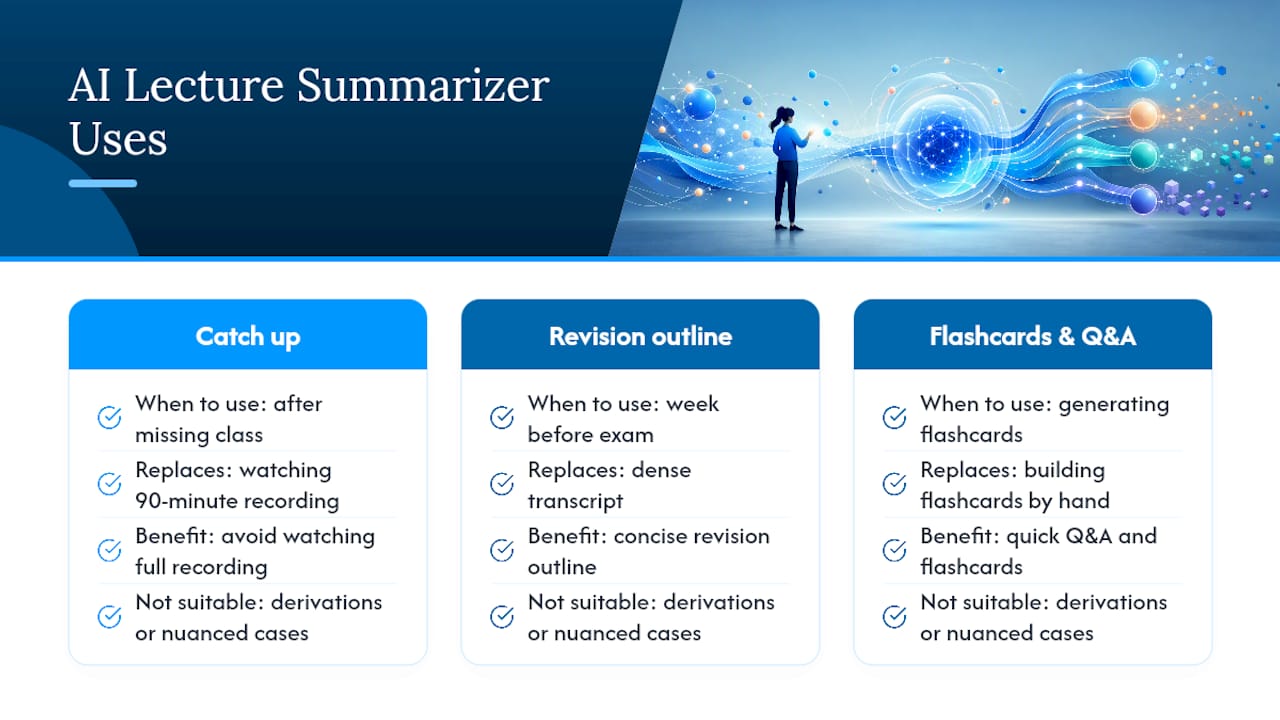
That said, a summarizer is not always the right move. If a professor works through a multi-step derivation or a nuanced clinical case, the original recording or your own notes still carry details a summary can flatten out. Use the summary to orient yourself and the source material to confirm anything you'll be tested on in detail.
How Do Lecture Summarizers Process Your Content?
Most tools follow the same basic pipeline, whether you're uploading a video file or pasting raw text.
- Upload, paste, or record the lecture material directly in the app.
- Transcribe audio or video into text using speech-to-text models.
- Index the transcript semantically, tagging topics, terms, and structure.
- Generate the summary, and optionally flashcards or Q&A, from that indexed content.
Transcription accuracy depends heavily on audio quality, how distinct the speakers sound, and how much specialized vocabulary the lecture contains. A cardiology lecture full of drug names and acronyms will trip up a general-purpose transcriber more than a survey course lecture will.
Processing speed varies with file size and how many input types you're combining. Several current tools finish typical lecture files in seconds to under two minutes, though a 90-minute video paired with a 40-slide deck will run longer than a five-page transcript pasted as text.
What Files Can You Upload or Paste?
Most lecture notes summarizers accept a wider range of formats than students expect, which matters if your professor records in one format and posts slides in another.
- Video: MP4, MOV
- Audio: MP3, WAV
- Documents: PDF, DOCX, TXT, PPTX/PPT
- Captions or transcripts: SRT files, or a hosted video URL
A few formatting habits improve results noticeably. Add a course name or topic title before you upload, include timestamps or slide numbers when they're available, and prefer a clean audio recording over one captured from the back row of a lecture hall.
Pro Tip: If your notes are already a jumbled mess of abbreviations and half-sentences, add one or two lines of context first, like "Pharmacology, Week 6, opioid receptors" — it gives the model something to anchor the summary to.
Which Summary Format Should You Choose?
Different study tasks call for different output shapes, and most tools now let you pick.
- Bullet points work best for a fast pre-exam review pass.
- Paragraph summaries suit topics where you need to understand how ideas connect, not just list them.
- Q&A pairs and flashcards are built for active recall, which is the format that actually sticks during spaced review.
- Checklists help when a lecture covers a sequential process, like a clinical assessment protocol.
More advanced tools go further: some attach timestamped or slide-referenced citations to individual claims, and several support exporting directly to TXT, DOCX, CSV, or flashcard formats compatible with spaced-repetition apps. Some platforms also extract action items and prioritized takeaways rather than just condensing text, which matters if a lecture includes follow-up tasks or reading assignments buried in the middle of a recording.
When you generate a summary, most tools let you set length and focus, so pick definitions and formulas for a technical course, or examples and case studies for something more applied.
How Do You Turn a Lecture Into a Study-Ready Summary?
The workflow is short enough to run between classes.
- Capture the lecture. Record it live, download the professor's posted MP4, or copy a transcript your school provides.
- Upload and set your parameters. Choose a summary style and length, and flag focus areas like definitions, formulas, or likely exam points.
- Generate, then verify. Check anything that sounds important against the timestamp or slide citation before you trust it.
- Refine if needed. Several tools include a chat interface for rephrasing dense sections or asking follow-up questions about anything unclear.
From there:
- Export flashcards directly into a spaced-repetition app.
- Copy the paragraph summary into your existing course notes.
- Save the Q&A set for a study group session.
Combining a video, a slide deck, and your own notes in a single cross-referenced session tends to catch details that get lost when you summarize each file separately, since an example tied to a specific slide doesn't vanish just because you fed the transcript in on its own.
What Features Are the Best AI Summarizer Apps Adding Now?
The direction these tools are moving in 2026 is toward outputs you can act on, not just read. Rather than handing back a wall of condensed text, top tools now parse lectures for action items, definitions, and high-yield concepts and convert them straight into checklists or Q&A pairs built for active recall.
The other meaningful shift is verification. Timestamped or slide-referenced citations attached to individual claims let you jump straight back to the exact moment in a recording, instead of scrubbing through 40 minutes of video hunting for the one sentence a summary paraphrased.
Pairing a summary with a clickable citation turns a passive recap into something you can actually cross-check, which matters most in courses where getting a detail wrong on an exam costs you more than a point.
Pro Tip: Before you trust a summary for a high-stakes exam, click through two or three of its cited timestamps at random. If they match what's actually being said, the rest of the summary is probably reliable too.
What Can't a Lecture Summarizer Do Reliably?
No summarizer handles everything well. Handwritten notes with inconsistent structure, poor-quality audio, dense multi-step technical derivations, and diagrams without text labels all tend to produce weaker summaries, sometimes silently.
- Confirm how long the tool retains your uploads and whether you can delete or export your data.
- Check whether uploads are used to train the underlying model, and whether you can opt out.
- Keep your original transcript or recording for anything you'll be tested on in detail.
- Verify complex or clinical claims by jumping to the timestamped source rather than trusting the summary alone.
Recallos publishes its own AI use disclosure covering how uploaded material is handled, which is worth comparing against any tool's privacy policy before you upload sensitive coursework.
How Do You Choose the Right Note Summarization Tool?
Run any candidate tool against a short checklist before you commit a semester's worth of lectures to it.
- Multimodal input support — can it handle audio, video, PDFs, and slides in one session, or just text?
- Timestamp or slide citations — can you verify a claim without rewatching the whole recording?
- Export options — does it push directly into flashcards or an Anki-compatible format?
- Adjustable summary length — can you get both a two-line recap and a fuller study outline from the same upload?
- Clear privacy policy — do you know where your uploads go and whether they train the model?
- Processing speed — does it return results in under two minutes for a typical file?
For general coursework, citation support and flashcard export matter most, since those two features are what actually let you trust and reuse a summary later. For nursing and healthcare students specifically, a summary is only half the job. You still need to turn that condensed content into daily, targeted practice against real exam blueprints. That's where Recallos fits differently than a general-purpose summarizer: it's built to take study material and turn it into adaptive review rather than stopping at a static recap.
A quick note on using summaries responsibly
I treat every AI summary as a first draft of understanding, not a final answer, and I verify anything high-stakes against the original source before I trust it. For more study workflows, see the teach-back method for pairing summaries with active recall.
How Recallos Turns Summaries Into Daily Practice
A summary tells you what a lecture covered. It doesn't tell you whether you'll remember it in three weeks, which is the actual problem nursing and healthcare students are solving for.
Recallos picks up where a lecture summarizer leaves off. Once you have a condensed set of concepts, whether it's from your own notes or a summarizer's output, Recallos converts that material into daily high-yield practice questions modeled on real NCLEX, CRNA, and CCRN exam blueprints, not generic trivia. Weak areas get flagged and resurfaced automatically, so review time goes toward what you actually need instead of what you already know cold. The platform was built by practicing nurses and CRNAs, which shows up in how closely the question style matches what you'll see on exam day.
The natural workflow: summarize a lecture, pull the key concepts into flashcards, then let Recallos schedule those concepts back into your daily practice with streaks and progress tracking to keep you consistent. Try the examples page to see how a set of study material maps into adaptive quizzes, or head straight to Recallos to start a daily review session.

Frequently Asked Questions
What is the best AI summarizer for lecture notes? The best notes summarizer for you depends on your input type and study goal. If you need citation-backed verification and flashcard export, prioritize tools that support timestamped or slide-referenced claims over ones that only produce plain text.
How do you summarize nursing notes specifically? Nursing content often mixes clinical terminology with procedural steps, so upload clear audio and add course context (like "Med-Surg, Week 4, cardiac assessment") before generating. Then convert the summary into daily practice questions, since recognizing a term is different from applying it under exam conditions.
Can an AI summary replace reading the original lecture material? Not for anything you'll be tested on in depth. Use a summary to orient yourself quickly, then verify complex or clinical claims against the original recording or transcript before treating them as settled.
How accurate are AI-generated lecture summaries? Accuracy depends on audio quality, speaker clarity, and how technical the vocabulary is. Tools with timestamped citations let you spot-check claims directly against the source, which is the most reliable way to catch an error before it costs you on an exam.
Do lecture summarizer tools work with handwritten notes? Some do, but results are inconsistent with messy handwriting or inconsistent structure. Typed notes, clean transcripts, or slide decks generally produce more reliable summaries than scanned handwritten pages.
Sources
Prefer sources with timestamp or slide citations when you need to verify a specific claim.